Showing posts with label Microsoft Azure. Show all posts

Saturday, July 02, 2016

Creating FTP data movement activity for Azure Data Factory Pipeline


Walkthrough


Just posted this step by step walkthrough of creating, testing and deploying the FTP Custom Activity using Visual Studio:

https://blogs.msdn.microsoft.com/cloud_solution_architect/2016/07/02/creating-ftp-data-movement-activity-for-azure-data-factory-pipeline/

Summary


Azure Data Factory supports many data stores today and it will support more in the future. If your data store is not in the list, custom activities are your best friend. With Visual Studio integration, it is very easy to create and manage custom activities as well as data factory pipelines.

Additional Resources


Tuesday, January 26, 2016

Building Next Generation Web Apps…

Here are the slides from my internal talk presented at Neudesic Office Day:

https://speakerdeck.com/jomit/building-next-generation-web-apps

Some of the code for the talk can be found at:

https://github.com/jomit/Node-Cloud

https://github.com/jomit/Node-ES6-Trials

Resources:


s

Wednesday, April 29, 2015

Build 2015–Day 1 Keynote (takeaways)


Azure

  • Docker for Windows (docker client for windows)
    • Mix and Match linux and windows containers and run it on any server.
    • Debugging apps within containers in linux on windows server using Visual Studio.
    • .Net Core RC (for linux, windows and mac)
  • App Service
  • Visual Studio (download)
    • A free code editor for MAC, Linux and Windows
  • SQL DB Elastic Pool
    • For managing lots of databases in SaaS type scenarios
  • SQL Data Warehouse
    • Directly competes with AWS Redshift and its better.
  • Data Lake
    • Store and process infinite data.

Office

  • Office Apps
  • New Unified Graph API to access all the data from 1 place
  • ‘Delve’ App
  • ‘Sway’ App

Windows

  • Windows 10 Universal apps
  • Windows Store Apps now support  (this is freaking awesome !!!!!)
    • Web Sites/Web Apps
    • .Net and Win32 Apps (using app virtualization)
    • Android Java/ C++ Apps
    • Object C Apps
  • Compile Object C code using Visual Studio on Windows
  • Hololens
  • Microsoft Edge  (final name for ‘'Project Spartan’ the new Browser on Windows 10)

Wednesday, July 02, 2014

Patterns for Cloud Apps on Azure


I have been working on a lot of new Azure projects and here are some really good articles, posters and video's that I found very useful around best practices/ patterns.


Azure Rocks !!!

Tuesday, April 15, 2014

Web Essentials and Visual Studio 2013 Update 2 (RC)


Here are some of the cool new features in the Web Essentials and VS 2013 Update 2 (RC):
  • Create Azure Websites and Virtual Machine from Visual Studio
    image
  • JavaScript code and style analysis via JsHint and JSCS

    image 
  • Manage Virtual Machines from Server Explorer
    image
  • Image Previews
    image
  • Create / Update  Image Sprites
    image
  • Minify/Bundle JavaScript & HTML
    image

There are ton of new exciting features. I would recommend to watch this “Fun” filled session presented by Scott Hanselman and Scott Hunter to get a good overview of what is in the release and what’s coming….

Thursday, April 03, 2014

Build 2014 - Day 2 (Notes)


Keynote

  • 57% of fortune 500 companies are using Azure. More than 300 million active directory users. Over 1 Million SQL Databases.
  • Azure powered the NDC Sochi olympics live media streaming
  • Support for Puppet and Chef infrastructure configuration tools
  • New features on Azure IaaS
    • Create and Manage VM’s from Visual Studio
    • Enable Debugging from VS and attach it to the VM
    • Azure portal now has plugins and agents for Puppet and Chef integrated in the VM Creation wizard
    • Puppet Enterprise Console demo (load a class for microsoft-sysinternals)
    • Speech from CEO of Getty Images. They use puppet and azure heavily.
    • Autocale feature is now available
  • New features on Azure Paas
    • Web
      • Azure websites will now support “Java”
      • Azure websites “Staging” feature
      • Traffic Manager support. Intelligent customer routing. It will work with websties as well virtual machines.
      • New options on the VS ASP.net web project creation screen to create websites directly from there
      • Sync CSS changes from IE DOM Explorer to Visual Studio CSS file. This works in Chrome and IE
      • Sync the editing of HTML tag values with HTML files in Visual Studio. (LIVE !!!!)
      • JsHint integrated for VS JavaScript debugging
      • WebJobs can be simple console applications which can listen to events fro Queue and Blob updates
      • Free SSL certificates for Websites
      • CDN generally available now
    • Mobile
      • Mobile services now support Active Directory
      • New VS Project Template for creating Mobile Service
      • Support for Local and Remote debugging for Mobile Services
      • New Mobile Services .Net API’s which can be used in all apps.
      • Demo of win 8 app with portable library + sharepoint document upload + xamarian to port the app to iOS
      • Demo of “DocuSign” app on iPhone. Built using ,Net and SQL Server.
      • “Offline Data Sync” features for Mobile Services
      • Azure AD Premium offerings
      • Kindle support for Notification Hub
    • Data
      • SQL Azure Database now supports 500 GB + 99.95% SLA
      • Self Service restore feature ( for emergenices like DELETE from tablename Smile) is now builtin
      • Active geo replication feature. Primary and Secondary region data replication.
      • Updates to HDInsight. Supports Hadoop 2.2
      • YARN support
  • Programming Languages & Tools
  • The New Azure Management Portal (https://portal.azure.com )
    • Reimagined modern design with live breadcrumbs to navigate easily
    • Extensible design
    • Integrated TFS Work Items, Check-in views, Code views, Application Insights.
    • Integrated Code Editor for complete DevOps lifecycle
    • Resource Groups (group of resources which are running an application)
    • New Azure Powershell cmdlets to publish resource templates
    • Export the entire script of the resource group in a ,json file. Similar to infrastructure scripts
    • Azure Resource Manager preview available
    • Visual Studio Online GA
    • Screenshots:

      image

      image

  • Part 2 of Keynote
    • Key developer concerns/questions
      • Support Existing Investments
        • Classic Desktop apps. Demo of WPF connected Office 365 Calendar API’s
        • Demo of old VB6 apps transformed to a Web App using WebMap
      • Mobile and Cloud First
        • Demo of geofencing component for foursquare
        • Demo of Heapsylon Sensoria capturning the foot sensor data and showing live feed on a windows phone
        • Launch of new “App Studio” to generate Windows 8 apps from Websites.
        • New Offline support using the HTML5 Index DB to cache the browsed data

Building services for Connected Devices

  • Key Aspects
    • End to end asynchronous data flow
    • Direct HTTP based connectivity and inbound messaging
    • Queue drien message processing
  • General Purpose IoT Architecture
    • Device
    • Protocol Gateway (Ingest)
    • Messaging and Eventing
      • Embedded Devices + Mobile Devices
      • Message Processing
      • Bulk Storage & Latent Analytics
      • More Stuff
  • Sample fast food outlet application
    • Updates published to central server every minute (~5Kb XML files)
  • Solution –> Azure web role as ingest and Message Queue + Azure workerrole
  • Ingest and Protocol Management
    • Device almost always has to initiate connections
      • Firewalls, NATs, dynamic IP, general network weirdness
    • Socket Management, Hold Sockets open, keep alives – latency on push notifications
    • Protocol – HTTP, AMWP, MQTT, TCP, custom (bluetooth etc)
    • Direct connectivity vs concentrator/local gateway
      • Smart Grid / Power meters
    • Message response
  • VS Code demo
    • ServicePointManager configurations for improving latency and concurrent connections with Storage
      • UseNagleAlgorithm
      • DefaultConnectionLimit
      • Expect100Continue
    • Queue “CreateIfNotExistsAsync” method should only be called once. Use factory method which initializes this
    • Unbound concurrency can bring down the system. E.g. Task.Run in a for loop
    • Use a Task.WaitAll outside the for loop. Inside the for loop just add Tasks to a task list.
    • In memory queue –> .GetConsumingEnumerable() API is a friend
    • Managing configuration settings between Worker Role and Web Role can cause issues. Instead of using app.config and web.config use the Role configuration to store the settings.

High-performance web platform

  • The Physics of FAST (Physical factors in performance )
    • Network Utilization and Limits  (bandwidth in mbps)
      • 2G  (0.1)
      • 3G  (1.8)
      • 4G HSPA+ (3.4)
      • WiFi (6.1)
      • 4G LTE  (7.5)
    • We can increase the bandwidth but latency might still be the issue (clap and response clap demo)
    • Speed and Responsiveness
      • CPU Utilization  / Elapsed Page Load
      • Real and Perceived performance
    • Memory Utilization
      • important when targeting low-cost devices with your sites and apps
    • Power Consumption
      • Let it rest !
      • CPU Utilization, GPU Utilization and VSync
      • Thermo mitigation (won’t charge since the device is too hot)
      • 5 Watt for Phone devices
    • Targets Devices Matter
      • Priortize those
  • Web Runtime Architecture
    • Networking cache
    • Parsers
      • creates internal data structures
    • DOM Tree (DOM API, JavaScript, CSS Cascade)
      • JS is sent to a sandbox
    • Formatting
    • Layout
    • Display Tree
    • Painting
      • DirectX services
    • Compositing
      • Handing over to GPU
    • Input / Hit Testing / DMANIP
  • Event Tracing for Windows (ETW)
  • Measuring Performance
    • F12 Developer Tools (UI Responsiveness uses the ETW events)
    • Windows Performance Toolkit
  • Performance in the Real World
    • Network Optimization
      • Navigation Timing (F12 Console –> window.performance.timing)
      • Average Payload
        • 93 resources, 16 hosts
        • 6 requests per host
        • 1.7 MB total size, 46% cacheable (on Mobiles)
        • Majority of the size is around “Images”
      • How to optimize Images
        • Right-size your images
        • Reduce # of downloads (use sprites and minified images)
        • Use a CDN
    • Speed and Responsiveness
      • Defer Script execution (scripts in bottom)
      • Reduce # of Frameworks (single frameworks or libraries)
      • Coaleasce style and layout changes
        • jittering of a control as we scroll
        • instead of updating the screen on every mouse event
        • just use css to paint it after the event is done
      • Use CSS Animation
    • Memory
      • Download size vs Memory Size
        • 557KB image –--->  Memory = width * height * 4
        • Process
          • Download Image
          • Decode
          • GPU Copy  (here the CPU and CPU is not doing anything)
          • GPU render 
        • Image Formats Matter (for both memory and CPU utilization)
          • JPEG is encoded to YCbCr and then decoded by CPU to JPEG for rendering (IE10)
          • GPU’s can render YCbCr so decoding is not needed for JPEG. (IE11 uses GPU for image rendering)
          • Use JPEG when possible instead of PNG (as they are much faster)


Building Services for Mobile Apps using ASP.net Web API 2.1

  • Mysteries of building backend services for mobile apps
    • SOAP ? REST ? ODATA ?
    • which framework ?
    • hosting?
    • security ?
    • consuming ?
    • offline ? notifications ? etc..
  • SOAP is not mobile friendly (If you need SOAP then use WCF)
  • HTTP and mobile – made for each other
    • Ubiquitous
    • Interoperable
    • Scalable
    • Flexible
    • Mature
    • Simple
  • Many faces of HTTP frameworks in .NET
    • WCF Web HTTP (underlying it sends XML so its kind off SOAP)
    • WCF Data Services
    • ASP.net MVC
    • ASP.net Web API
      • A framework for creating HTTP services that can reach a broad range of clients
  • Why ASP.net Web API
    • First class modern HTTP programming model
    • Easily map resources to URI’s and implement the uniform interface of HTTP
    • Rich support for formats and HTTP content negotiation
    • Request validation
    • Enable hypermedia with link generation
    • Separate out cross cutting concerns
      • authorization
      • caching
      • message header
    • Help page generation
    • Flexible hosting
      • can be hosted outside IIS within an EXE
    • Light-weight, testable, scales
    • 2.0 features
      • OWIN Integration
      • Request batching
    • 2.1 Features
      • Global error handler
      • attribute routing improvements
      • BSON formatter
      • Portable query building and parsing
  • Samples and Docs http://www.asp.net/web-api
  • Code at http://aspnetwebstack.codeplex.com
  • REST and OData
    • REST is an Architectural style for distributed sytems
      • Defined by set of constraints (client-server, stateless, cacheable, layered, uniform interface)
      • Induces properties: performance, scalability, evolvability, reliability, transparency
      • Do a the Web does
    • OData
      • Is a protocol for interacting with REST-based data services
      • Solves common issues (querying, paging etc)
  • Web API 2.2 #NEW# features
  • Build client logic as “Portable Libraries” (share code between Desktop, Phone and Windows)
  • Security for Web API’s
    • User Authorization filters (ex [Authorize])
    • Implement your authorization logic
      • derive from authorizationfilterattribute or implement IAuthorizationFilter
  • Make Web API’s secure with OAuth 2.0
    • Authorize requests using OAuth 2.0 Bearer tokens
  • Get tokens from a trusted authz server
    • Host your own
      • MS OWIN for simple server implementation
      • Use thinktecture full server implementation
    • Use Existing one
      • Azure active directory
      • ADFS on windows server 2012
      • Azure mobile services

Windows App Studio (Beta)

Wednesday, April 02, 2014

Build 2014 – Day 1 (Notes)


Keynote:

  • Mobile First / Cloud First vision and strategy
  • Microsoft announced Windows Phone 8.1 and Windows 8.1 Update
  • New personal assistant “Cortana” – Microsoft’s answer to ‘Siri’ comes on Windows Phone 8.1
    • Remind me to ask about puppy when I talk to “blah” next. (reminds when the call arrives)
  • Many new features and optimizations on Windows Phone 8.1
    • Weekly calendar views
    • Swipe keyboard (World records of fastest phone keyboard)
  • New Universal App development approach
    • Share code between ALL Win 8 platforms (Phone, Desktops, Tablets, XBox One) easily with special Visual studio templates
  • WinJS is now Open Source
  • Visual Studio 2013 Update 2 RC available now
  • Windows 8.1 Update available now on MSDN
  • New Nokia 930 and other lumia devices announced

Single Page Application with ASP.net and Angular.js

  • Sample to get started
    • include angular.min.js
    • create a controller js file and include it
    • add the ng-app attribute on the html tag
    • bind the controller to body
      <body ng-controller=”testController”>
    • Sample repeater control
      <div ng-repeat=”card in cards”>
      Card {{card.id}}
      </div>
    • testController is just a function
      var testController = function ($scope) {
         $scope.cards = [ { id:1 }, { id:2 } ];
      }
  • Bundling and minification may not work as angular needs the name $scope
  • Use either nuget or cdn to get the angular js files
  • keep you app controller js files separate
  • Angular Items
    • Modules
      var mainApp = angular.module(‘mainApp’,[‘testController’]);
      var testController = angular.module(‘testController’,[]);
      angular.controller
      ng-app=”mainApp”
    • Controllers
    • Dependency Injection
    • $http
      Lightweight API for AJAX requests
    • $resources
    • Filters
    • routing


What’s new in WinJS

  • WinJS 2.1 for Phone
  • WinJS vision is to create a cross platform library for all devices
  • WinJS is now Open Source and accepts contributions from community
  • WinJS can now be used in cross platform Web sites and apps
  • New Pivot Control for Phone
  • Improvements and Support of WinJS controls on Phone
    • Appbar on Phone
    • ListView on Phone
    • Semantic Zoom on Phone  (e.g. grouped listview by alphabets. contacts list)
    • New Animations on Phone
    • User Themes on Phone
  • App bar code automatically adjusts between Phone and PC
  • WinJS Ratecontrol works with Angular and Knockout via 2 way binding
  • http://try.buildwinjs.com/

Large Scale JavaScript with TypeScript

  • Project “Monaco” – full code editor in browser for azurewebsites.
  • JS Code base roadmap for “Monaco”
    • Small – 50 KLOC  (Modules, classes, promises) – 10% typescript
    • Medium – 100 KLOC (AMD, lazy loaded, contributions) – 50% typescript
    • Large – 200 KLOC  (components, API, dependency injection) – 100% typescript
  • Concerns with Javascript
    • organizing a large and growing code base
    • refatoring javascript code is difficult
    • describing API’s
  • TypeScript to rescue
    • Optional and Structural typing
    • Classes, Modules
    • Interfaces (very powerful)
      • interfaces named object types of describing the shape of JavaScript objects
  • Typescript has Generics
  • Typescript Type Definitions project on github (‘DefinitelyTyped’ respository’)
  • Code Organization Pains
    • Modules are open
      • undisciplined name space contributions
    • You can have a cyclic dependencies
      • without noticing
    • Name spaces have no relationship to the code organization on disk
      • renaming files/name spaces is no fun
    • Growing code pains
      • requires ordering of js files
      • dependencies between files
      • eager loading (may load lots of stuff which is not needed)
  • TypeScript External modules for rescue
    • Separately loaded code referenced using external module names
      • implemented in separate source files
      • entities are private unless exported
    • Module Pattern
      • CommonJS
      • Asynchronous Module Definition (AMD) e.g. requireJS
  • Monaco
    • Server uses node.js
    • Client
    • Common module syntax enables code sharing between client and server
  • AMD migration was very good. Self contained modules.
  • AMD Applied
    • Lazy Loading
  • Componentization
    • reuse typescript code as ‘binary’ JS components with a declarations file
    • e.g. 
      • tsc – declarations –out typescriptservices.js typesript.ts
      • generates typescriptservices.d.ts

Monday, November 11, 2013

Cross Domain AJAX Calls and SharePoint Apps on Office 365

To give a bit of background, I have been exploring architectures and various components needed to create a multi-tenant SharePoint App. So far I have settled on using SharePoint only, as a frontend layer and using external services to drive the entire backend, including storage.
Given this high level design the first interesting item that I came across was while posting data to the backend Service from a SharePoint Hosted App. The classic client side Cross-domain security issue. Here are some of the solutions out there for this issue:
  • Using the JSONP hack
    • Due to its nature, this only works for ‘GET’ requests and I wanted to do a ‘POST.
  • Using the default SharePoint 2013 Web Proxy
    • I was able to make the ‘GET’ requests work with this approach but not the ‘POST’ requests.
  • Creating a Custom Proxy
    • Worked but involved quite a few hoops and a remote web page, which I did not want to create.
  • Enabling Cross Origin Resource Sharing (CORS) in WCF Services
    • Worked perfectly !!!
For simple requests we can enable CORS by setting some response headers like Access-Control-Allow-Origin, Access-Control-Allow-Methods and Access-Control-Allow-Headers with the value ‘*’. 
But all requests from Office 365 contain special headers and hence they are ‘Preflighted’, which means they would first send an http request with “OPTIONS” method to check the domain and then send the actual request. (More details on Preflighted requests here) For Preflighted requests we need to write some extra code along with adding the response headers. Here is a good article with sample code that explains this and below is the snap shot of the code:
image
image
image
And here is the snap shot of the sample app working on Office 365:
image

Additional Resources on CORS and Multitenant Applications with Azure:

Sunday, October 20, 2013

Avengers Emergency Helpline - Connecting Things to Internet


Avengers Emergency Helpline site. I will explain how I did this in my next post.

Enjoy playing with real things !!!….

Friday, December 28, 2012

Authentication with Office 365 from an On-Premise Application

Recently I had a problem wherein I needed to connect to an Office 365 SharePoint site from an on Premise Windows App.
Now at first it seemed simple but as I drilled deeper I came across some challenges and while overcoming them I learned a lot more about how O365 Authentication works.

Before I go further I would like to point out 2 resources which helped me a lot in solving this challenge:
Here is that diagram which explains the AuthN basics for SharePoint Online in Office 365:
Passive claims AuthN 
(So the key here is to understand that SharePoint Online uses the binary token returned from the STS service located at login.microsoftonline.com to validate all requests.)

At first I tried using the “MsOnlineClaimsHelper” but I couldn’t get it to work as it kept on throwing errors while fetching the response using ‘WSTrustFeb2005ContractClient’. Then I looked at the WinRT code and it was doing the exact same thing but with much less dependencies. Just plain HttPWebRequests + XML.

But the WinRT code was specifically for REST API’s and not Client Object Model. So I modified the code a little bit to make it work with CSOM.

Here is the link to Helper class code that I created and used for one of the code samples on MSDN.


Wednesday, April 18, 2012

Implementing federated identity in SharePoint 2010


Recently, I started working on a scenario wherein we had to move an existing online portal to SharePoint 2010. The first interesting challenge was authentication. How do we support existing users as well allow users to use other identity providers like live, facebook, google, myopenid  to access the portal. So I started researching on that and below are my findings:
For implementing federated identity in SharePoint 2010, we need to use Claims Authentication and below are our 3 options:
· Windows Claims
· Forms based Claims
· SAML Claims
Since we want multiple identity providers like google, yahoo, facebook, myopenid etc., my recommendation would be to use SAML claims via a custom Claims Provider. Below are some examples on how to do this:
For Live Id we can generate SAML tokens directly using MSM but for other providers in general we have 2 options :
1. Setup Azure’s Access Control Service (aka. ACS) with multiple Identity Providers (google, yahoo, facebook, live id, etc.) and add ACS as Trusted Provider in SharePoint
clip_image001
Pros/Cons :
ACS is more scalable and it has built-in support for Live Id, Google, Facebook, Yahoo and WS-Federation.
We have to pay the Azure Access Control Service cost
2. Create custom Claims Provider, integrate it with all the identity providers using OAuth Server Side flow and add the custom provider as Trusted Provider in SharePoint.I also found this custom claims provider component, which meets the requirements
clip_image002
Pros/Cons :
Custom claims provider would require some hefty code for generating SAML tokens and managing multiple identity providers.
Since this would be our custom component we do not have to pay for any other services.
Hope this helps.

Sunday, November 29, 2009

Summary of all PDC09 – Announcements / Product Features / Cool Stuff


Silverlight

  • Silverlight 4.0 Features & More:
    • Support for Webcam, Microphones, Right Click, Mouse Wheel
    • New Rich Text control
    • Clipboard Access
    • Print Preview Dialogs
    • Authorization support in Client HTTP Stack (NTLM, Basic, Digest)
    • Running outside sandbox for Trusted Out of browser applications
      • HTML rendering control inside Silverlight
      • Local file system access
      • Keyboard in full screen
      • COM automation support (read word/excel files)
      • Notification Popups
  • Screen Presentation Framework (MVVM + Prism) for Silverlight
  • Silverlight Media Framework - Smooth Streaming Porting Kit
  • Microsoft XAML Toolkit : Provides Static Analysis, Localization, & XamlDom for .NET/Silverlight XAML
  • ADO.NET Data Services is now “OData”  - Open Data Protocol & WCF Data Services 
  • .NET 4 Location API - Installed by default with .NET 4 and supported in Visual Studio 2010. (System.Device.dll) See WHDC site for Sensors/Location : www.microsoft.com/WHDC/Sensors
  • Bing Maps Silverlight Control
  • Advanced Performance & Profiling in Silverlight 4
  • WCF RIA Services for Silverlight

SharePoint

Windows Azure

  • Windows Azure + Windows Identity Foundation + ADFS2 : https://federatedidentity.cloudapp.net/
  • Windows Azure Platform AppFabric - provides secure connectivity as a service to help developers bridge cloud, on-premises, and hosted deployments
  • Velocity is now “Windows Server AppFabric Caching”
  • Dublin is now  “Windows Server AppFabric” - The Windows Server AppFabric supports WCF and Workflow services by:
    • Providing runtime databases
    • Capabilities for monitoring, persistence, hosting and caching
    • Tooling and scripting to manage and monitor WCF and WF services
  • Windows Azure :
    • Features
      • Blobs – Provide a simple interface for storing named files along with metadata for the file
      • New Type - Page Blob
      • New Operations – Updated, Copy, Snapshot, Lease Blob
      • New Ways of Accessing and Service Blob Content -
        • Custom Domain Names
        • Root Blob Container
        • Content Delivery Network access
        • Shared Access Signatures
      • Entity Group Transactions - Atomically perform multiple insert/update/delete
        over entities in same partition in a single transaction
      • Dequeue count returned with message
    • Futures
      • Administrator privileges in the VM
      • Deployment of pre-configured VM images
      • User-selectable geo-locations for replicas
      • Secondary indices on tables
      • New storage option “Drives” - Provides durable NTFS volumes for Windows Azure applications to use (Feb 2010)
      • Remote terminal server access to VMs
      • Microsoft Sync Framework and ADO.NET Sync Services - Tools for data synchronization with SQL Azure
  • TCO and ROI Calculator - provides a customized estimate of potential cost savings you (or your company or organization) may achieve by building on the Windows Azure Platform
  • Windows Azure Diagnostics - SDK component providing distributed monitoring & data collection for cloud apps
  • Visual Studio 2010 RTM and SQL Azure Futures:
    • Connect to SQL Azure – Data | Add New Data Source (DataSet & EDM)
    • EDM Conceptual Data Modeling Designer – Generate database
    • Server Explorer – Browse
    • Data Sources Window (DataSet, EDM, LinqToSQL, data binding tools)
    • Configure SQL Data Source
  • File Classification Infrastructure (FCI) - provides many avenues to be part of end-to-end data lifecycle management solutions
  • “Houston” - Project Houston will provide a easy to use cloud based database development experience
  • Access Control Service - claims based access control for REST web services
    • Implements OAuth Web Resource Authorization Protocol (WRAP) & Simple Web Tokens (SWT)
    • Integrates with AD FS v2

Surface & Windows 7

  • Multitouch on Windows 7
    • Manipulation Events
    • ScrollViewer Panning Support
    • WPF Controls Styles with Panning Enabled
    • Multi-Touch on the web with Silverlight
      • Manipulation and Inertia Process API
  • Windows API Code Pack – Managed Class Library to access to Windows (7) features
  • “Surface Toolkit for Windows Touch” – Would be coming shortly after the WPF4 Launch
  • Surface Futures:
    • Cheaper
    • Thinner
    • Vertical
  • Surface SDK & Resources now available free

Visual Studio, WCF, WPF

  • WCF 4.0 Features:
    • Default Endpoints, Protocol Mapping, Binding Configurations,Behavior Configurations
    • File-less Activation (no .svc)
    • Simple Ad-hoc Service Discovery
    • Service Announcements
    • Routing Service
    • Message Filters and Content-based Routing
    • Automatic Help Page
    • HTTP Caching Support
  • WPF 4.0 New Features: Here is an excellent blog series from Lester covering all the below features with sample code:
    • MultiTouch
    • DatePicker\Calendar
    • Datagrid
    • Visual State Manager (VSM)
    • Easing Functions
    • JumpLists
    • Pixel Shader 3 support
    • Cached Composition
    • Full trust Xbap Deployment
    • Binding to Dynamic Objects
    • Custom Speller Support
    • Script Interop in Xbap
    • UIA Virtualization
    • UIA SynchronizedInputPattern
    • Input Key\Gesture Binding
    • TextFormattingMode
    • CaretBrush
    • SelectionBrush
    • Bindable Run
    • ClearTypeHint
    • LayoutRounding
    • Updated File Dialogs
  • Manycore & .NET 4.0 with Visual Studio 2010 (Concurrency):
    • ThreadPool.QueueUserWorkItem
    • System.Threading.Tasks.Task + System.Collections.Concurrent
    • New Sync Primitives in .NET 4
    • Visual Studio 2010 Concurrency Profiler Views + Parallel Debugger Toolwindow
  • Visual Studio 2010 Extensibility – Extensions Gallery & VSX Samples

ASP.net & SQL Server

Microsoft Research & Labs

  • Infer.NET - framework for running Bayesian inference in graphical models (from MSR)
  • “Axum” : A .NET Language for Safe and Scalable Concurrency
  • “Holmes” - Automated Statistical Debugging using Path Profiles (from MSR)
  • “Darwin” - An Approach for Debugging Software Regressions (from MSR)
  • “Project Trident” - A Scientific Workflow Workbench (from MSR)
  • “Pivot” by Live Labs : Visualizing collections of objects, Revealing hidden patterns within data, Acting on discovered insights
  • DevLabs: Reactive Extensions for .NET (Rx)
  • Trustworthy Data Collaboration SQL Azure Codename ‘Vidalia’
  • Microsoft Codename “Dallas” - Content Brokerage and Discovery platform

Other

Wednesday, November 18, 2009

@PDC09 – Day 2 – Developing Advanced Applications with Windows Azure

                                                                   (Rough notes from the session)
By Steve Marx, Technical Strategist, Microsoft Corporation

LB –> Web Role + Worker Role

Official shipping version of the Table Storage SDK is available now

What we’ll Build – Search application using IIS + SMTP  + Web and Worker Roles
  • Three role architecture
    • Web UI (ASP.net MVC)
    • SMTP Server (TCPListener)
    • Search (Lucene.NET)
  • New Features we’ll take advantage of
    • Inter-role communication
    • Non-HTTP endpoints
    • Role instance lifecycle
    • VM sizes
    • Local storage
HOW TO: Model your application
  • Draw the boxes and arrows
  • Each box is a role
    • Which receive traffic from the internet
    • Which need IIS?
    • Which receive internal communication?
Receiving Traffic. Input Endpoints
  • Different ports on the same domain
  • Always load balanced
  • Declared in ServiceDefinition.csdef
  • Handled by IIS in web roles
  • Handled by your code in worker roles
  • API to find
The instance could should always be atleast 2 or else SLA isn’t valid.
Azure Storage Explorer in codeplex

Input Endpoints Demo :  Set the configurations in the xml file
As an Aside about Email
  • Spammers will use Windows Azure. (sending email should not be done via azure as the IP is not trusted)
Asynchronous work without a Queue
  • Queues deliver messages to one worker
  • We need every worker to see the messages
  • Use a table instead
    • build your own secondary index
    • order references
    • (Beware of clock drift!!)
HOW TI: DO Initialization
  • don’t want traffic until we are listening
  • role instance lifecycle lets us prepare
    • both web roles and worker roles
    • OnStart() - “busy” state, initialization
    • Run() – do work
    • OnStop() – traffic stops, graceful shutdown
HOW TO: Internal Endpoints
  • Declare endpoints in servicedefinition.csdef
  • API to find out what port to listen on:
    RoleEnvironment.CurrentRoleInstance.InstanceEndpoints[“”]
For internal endpoints always rely on the API to provide the port number, do not assign any port number.
HOW TO: Get more RAM
  • RAMDirectory puts everything in memory
  • If we have lots of data, we need lots of RAM
  • Choose among four VM sizes:
    • Small
    • Medium
    • Large
    • Extra Large
  • Simple edit to servicedefinition.csdef
    <WorkerRole  vmsize=”ExraLarge” />
HOW TO: Save the Index
  • Lucene.NET writes files to the local system
  • Preserve those across reboots/upgrades : 
    <LocalStorage cleanOnRoleRecycle=”false” />
  • Consider writing state on OnStop()
    (this is the to write I was on record XX and save the last state)
Using In-Place Upgrade
  • Rolling Upgrade
  • Specify which roles to upgrade
  • Keep local storage intact
  • Great for stateful roles

Call of Action:
  • Any instance can talk to any other
  • Don’t need IIS to listen for traffic
  • Use the role instance lifecycle
  • Choose different VM sizes
  • In-Place upgrades

Monday, January 05, 2009

Bits on 'Cloud Computing' . . . . . !!!


So What is Cloud Computing ?
"Cloud computing is Internet-based ("cloud") development and use of computer technology ("computing"). The cloud is a metaphor for the Internet, based on how it is depicted in computer network diagrams, and is an abstraction for the complex infrastructure it conceals."
Live Services, Live Mesh, Live Platform, Windows Azure, SQL Services, .Net Services . . .
these are some of the titles associated with the cloud offerings from Microsoft.
So where should we start from ?

I would recommend to start with the Live Framework. Here is a brief description of some of the basic concepts of live framework including some of the common application models and different flavors of Live Operating Environments available today. ( What is Live Framework and Why Should I Care? )

( Mike Taulty has written some good posts describing his development experience with Live Framework SDK which might be useful for all. )


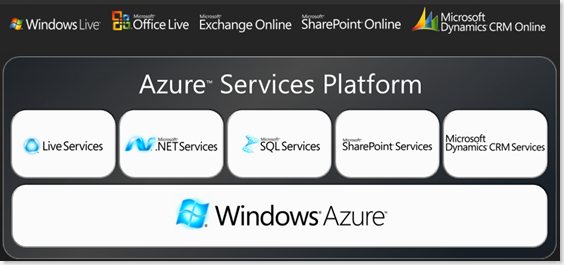
The next step could be to explore the Azure Services Platform, which includes .Net Services, SQL Services, SharePoint Services and Live Services as well. 

azureservicesplatform

( Here is a good list of Links and Resources from Sriram Krishnan on Windows Azure. )

AddIn