Friday, March 06, 2009

How to create context menus and capture right click event in Silverlight


Context menus & right click event is something which is not out of the box supported in silverlight but I think they prove to be very crucial while developing LOB applications. So here is a workaround on how you can create them. Basically I am using HTML/Javascript to create and render menus on top of silverlight but it involves a few tweaks which are listed below.

First tweak is – How to display a HTML Menu on top of silverlight control.
For this we need to change 2 properties on the .aspx or .html page where the silverlight control is being hosted.

      <param name="background" value="transparent" />
  
<param name="windowless" value="true" />


Than capturing the right click event in HTML and displaying our menu.

<
script language="javascript">

  function click(e) {
     if (navigator.appName == 'Microsoft Internet Explorer' && event.button == 2) {

                var menu = document.getElementById('myMenu');
                menu.style.left = event.clientX + 'px';
                menu.style.top = event.clientY + 'px';
                menu.style.visibility = 'visible';
                return false;
            }
            return true;
  }
  document.onmousedown = click

</script>

'myMenu'
is a <div> I have created on the html page which contains a simple table as below:

<
div id="myMenu" style="position: absolute; visibility: hidden; width: 75px">

   <table width="100%" style="background: #000000" cellspacing="1" cellpadding="1">
    
<tr style="background: #FFFFFF">
         <td onclick="SomeFunctionWhichCallsSilverlight()" style="cursor: hand">
             
Edit
        
</td>
    
</tr>
     <tr style="background: #FFFFFF">
         <td onclick="SomeFunctionWhichCallsSilverlight()" style="cursor: hand"> 
              Save

        
</td>
    
</tr>
     <tr style="background: #FFFFFF">
         <td onclick="SomeFunctionWhichCallsSilverlight()" style="cursor: hand"> 
              ________

        
</td>
    
</tr>


     <tr style="background: #FFFFFF">
         <td onclick="SomeFunctionWhichCallsSilverlight()" style="cursor: hand"> 
              Exit

        
</td>
    
</tr>

   </table>


</
div>

The SomeFunctionWhichCallsSilverlight() function would be the interop function to call the relevant Silverlight function as described in my earlier blog.

Now the last thing is to disable the default ‘SilverlightConfiguration’ menu

<body oncontextmenu="return false">


You can download the sample code from here

Monday, February 23, 2009

‘OneNote on Cloud’ – First bits deployed on MESH


I have deployed the first bits of my OneNote application on Cloud. Currently I have created a very basic version with Pen / Text for writing the notes.

onenotemesh

Overall the aim is to get the know how of Windows Azure platform including .Net Services, Mesh Enabled Web Applications (MEWA) and SQL Data Services.

 image

I have already created the SDS Proxy WCF Service. So the next step is to configure and deploy it on Azure. Than finally to tie all the pieces together . . .

Wednesday, February 18, 2009

Accessing SQL Data Services from Silverlight


“OneNote on Cloud”…  This is something I have started exploring on since last couple of days. 
The idea is to have a OneNote type application experience on web, using Silverlight and SQL Data Services.

The first hurdle was to access SDS from silverlight. We can’t directly use the SDS from silverlight because of some known limitations. So the option that I thought of was to use some Proxy Services in between the Silverlight Client and SDS, which was also suggested by the guys who developed the Omega.SDSClient

Now there are few gotchas while developing these proxy services for silverlight client which I am listing below :

  1. We need to Change the service bindings to ‘basicHttpBinding’ as silverlight doesn’t support any other bindings.
  2. We need to set the AspNetCompatibilityRequirements attribute to ‘Allowed’ for all the service implementations
  3. (If we add the services using the ‘Silverlight-enabled WCF Service’ template than the above changes are done automatically.)
    silverlightenabledservice 
  4. The last thing is to add the cross-domain policy file at the root of in case of IIS hosted services it should be on the root of the mapped directory. 

     crossdomainfile

    The important thing to note in this file is the SOAPAction headers which are required to be enabled for SOAP based messages transfers from silverlight.

Friday, February 06, 2009

Getting started with ‘Microsoft Surface’ development


This week I went on a roller coaster ride of formatting & configuring my laptop for Surface development. I will just brief out the steps that I had to do before installing the Surface SDK 1.0 :

(You would need a monitor that is capable of 1280 × 960 screen resolution or a widescreen monitor that is capable of 1440 × 900 screen resolution to start the Surface Simulator)

Now lets build our first surface application using Visual C# 2008 Express Edition :

  1. Under the Create New Project you should be able to see couple of VS Templates for surface apps:

    new project 
  2. Select the Surface Application (WPF) and you would see the default template as below :

    template
  3. The First interesting control to look at is the ScatterView control.
    (The ScatterView control is the control that you should use when you have one or more UI elements that you want users to be able to move, rotate, or resize freely within a fixed area)

    scatterview
  4. Once you build the application first open the Simulator and than press F5 to run the application and it would automatically get displayed on the simulator . . .

    surface
    As you can see I have added multiple fingers on the screen so you can use your mousepad (on laptop) and your external mouse as two fingers and than can stretch or rotate the images . . . .

Enjoy Learning !!!

Thursday, January 29, 2009

Disposing SharePoint 2007 and WSS 3.0 Objects


Here is an excellent article by Roger Lamb explaining the various design patterns to be used for disposing various SharePoint and WSS objects before deploying to the production environment.
Some of these may cause serious implications and memory leaks if not addressed correctly. In particular there are 3 objects to be taken care of,  Microsoft.SharePoint.SPSite , Microsoft.SharePoint.SPWeb and Microsoft.SharePoint.Publishing

There are also couple of White Papers by Scott Harris's on MSDN for more details:
Best Practices: Using Disposable Windows SharePoint Services Objects
Best Practices: Common Coding Issues When Using the SharePoint Object Model.

Also recently there is a Tool published on the MSDN Code Gallery which provides assistance in correctly disposing of certain SharePoint objects to help us follow these best practices.

SPDisposeCheck.exe is a command line tool which takes the path to a managed .DLL or .EXE or the path to a directory containing many managed assemblies. It will recursively search for and analyze each managed module attempting to detect coding patterns based on the MDSN article.

Below is the screenshot of the actual output generated which running the spdisposecheck on the sample exe. Reading the command line output is a bit tedious. Although the documentation states that this tools has an -xml option to output the details to an xml file but it doesn't seem to work for me..SpDisposeCheck

Friday, January 23, 2009

Live Mesh Beta & Live Mesh Tech Preview


I just installed the Live Framework SDK and started playing around with the Live Mesh and came up with some interesting things to share.

The first thing to remember is that "Live Mesh Beta" and "Live Mesh CTP" are two different Mesh Environments.

The Live Mesh CTP : https://developer.mesh-ctp.com/ installed from the Live Framework SDK is a developer sandbox environment with limited options and doesn't include the File/Folder Synchronization functionality.  

The Live Mesh Beta : https://www.mesh.com/ is preview environment with full set of options including the File/Folder Synchronization functionality. 

For developing Mesh Applications we have to use the Live Mesh CTP only.

If you have registered for both these services than probably you would have 2 clients installed on your machine :


clients

Initially while signing in for the Live Framework client I got a message box popup saying :

---------------------------------------------------------------------------------
Unable to sign in to Live Mesh.

Please make sure your user name and password are correct.

Request to MOE failed with return code "0x80070005"
---------------------------------------------------------------------------------

Finally I got this resolved by disabling the antivirus software running in the background and now my laptop is "meshified" and ready to mess around inside the sandbox :-)  

mymesh

Monday, January 05, 2009

Bits on 'Cloud Computing' . . . . . !!!


So What is Cloud Computing ?
"Cloud computing is Internet-based ("cloud") development and use of computer technology ("computing"). The cloud is a metaphor for the Internet, based on how it is depicted in computer network diagrams, and is an abstraction for the complex infrastructure it conceals."
Live Services, Live Mesh, Live Platform, Windows Azure, SQL Services, .Net Services . . .
these are some of the titles associated with the cloud offerings from Microsoft.
So where should we start from ?

I would recommend to start with the Live Framework. Here is a brief description of some of the basic concepts of live framework including some of the common application models and different flavors of Live Operating Environments available today. ( What is Live Framework and Why Should I Care? )

( Mike Taulty has written some good posts describing his development experience with Live Framework SDK which might be useful for all. )


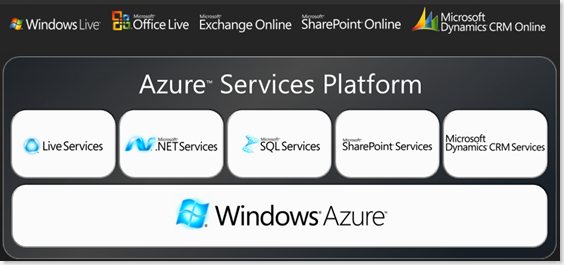
The next step could be to explore the Azure Services Platform, which includes .Net Services, SQL Services, SharePoint Services and Live Services as well. 

azureservicesplatform

( Here is a good list of Links and Resources from Sriram Krishnan on Windows Azure. )

Tuesday, December 30, 2008

Loading & Unloading Assemblies from GAC on runtime


Recently we developed a tool for Inspecting whether the system has the required components for Silverlight SharePoint Integration.
This tool provides a checklist of things which are required & not installed on the users system and then allow the user to install them and re-run the Inspection.

The tricky part was to re-run the inspection for the assemblies in GAC. We were using the Assembly.Load method to dynamically load the assemblies from GAC and than just have a null check against it.
But the issue was that once we load the assemblies it doesn't allow to unload it. Which means that this would not work as expected when we try to re-run the inspection and try to re-load the same assembly within the same application domain.

The solution was to create a separate application domain and than load the assembly in that appdomain and than unload the appdomain once used.

Here is a sample code of the Inspection button click :

image

Wednesday, December 03, 2008

Creating a Tag Cloud in Silverlight


For one of our Data Visualization projects I wanted to create a Tag Cloud type UI in Silverlight. Googling around I found this very nice article on this.

I decided to reproduce the user control so I could learn more about Silverlight and also added few customizations and some mouse enter and leave events to highlight the selected tag.
I also made some other small modifications to clean up the code a bit.

Here is the screen of the control :

tagcloud

You can download the source code from here.

Sunday, November 30, 2008

‘Concurrency’ – The elephant in the room . . .


Concurrency is one of the biggest challenges the industry is working on now days. Anders mentioned about the details of this in his talk ‘Future of C#’ at PDC.
So what’s the problem about?
Concurrency is about doing multiple tasks simultaneously. Most of our applications today do this asynchronous programming using multiple threads/processes but they all work on a Single CPU.
This worked fine until now as the single CPU’s were getting faster and faster as per the Moore’s Law and hence the applications would also just run faster without us having to do anything.
But now we are facing some physical limitations increasing the speed of a Single CPU. So to increase the processing power we need to have multiple CPU’s in a single machine. Hence we are already getting many core machines with 2, 4, 8 to 64 CPU’s.
So how does this impact us as a Developer?
With this solution in place the traditional asynchronous programming isn’t going to help us scale our applications. We would have to create programs which can divide their workload into tasks that can be executed in parallel on Multiple CPU’s.


Parallel FX (PFX)

Microsoft is developing a number of technologies to simplify parallel programming. Parallel Extensions for the .NET Framework (PFX) is an example of this. It is a managed programming model for data parallelism, task parallelism, scheduling, and coordination on parallel hardware. This technology was first discussed by Anders Hejlsberg and Joe Duffy in Oct 2007 and was initially provided as an extension library but it’s now deeply integrated into the .Net Framework 4.0.


Task Parallel Library (TPL)
The basic unit of parallel execution in the TPL is a ‘Task’. The Parallel.For() and Parallel.ForEach() static methods create a Task for each member of the source IEnumerable and distribute execution of these across the machine’s available processors using User Mode Scheduling.

ParallelFor
Parallel LINQ (PLINQ)
We can setup a LINQ query for parallel execution using PLINQ. We just need to wrap IEnumerable<T> in an IParallelEnumerable<T> by calling the AsParallel() extension method.
PLINQ

Daniel Moth did an excellent presentation on PFX at Tech-Ed which you can watch here.

For more details you can go to the PFX Team blog site which contains lots of videos and tutorials on parallel programming.

Monday, November 17, 2008

First Look at - "Windows 7"


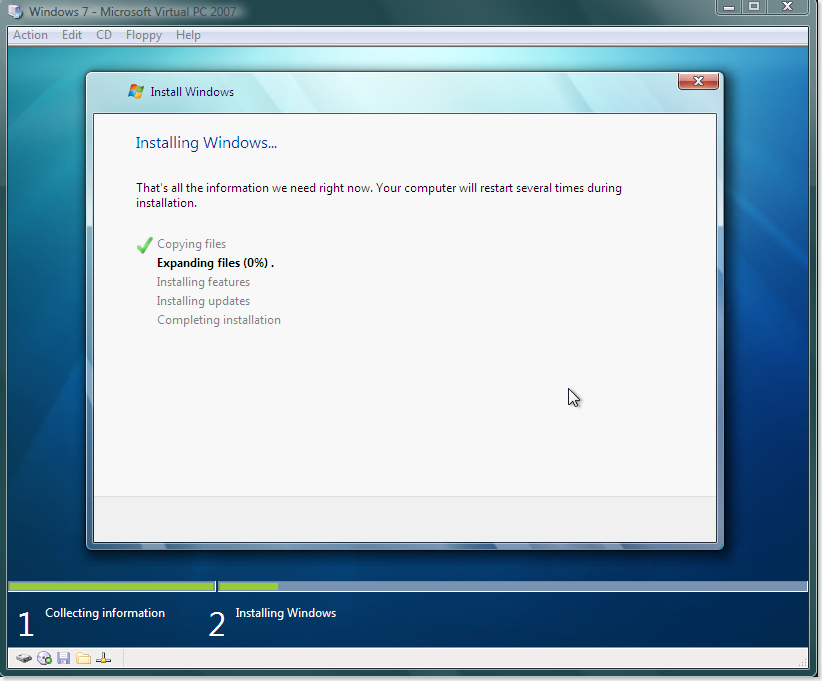
Install Experience :

1

2

3

Its just a 2 step pretty smooth installation procedure. Took me about an hour to finish the entire thing.
The theme and the UX looks similar to Vista with a few tweaks here and there.

The wordpad has the office ribbons and the calculator has a new UI with additional modes :

wordpad_calc

Another good feature is the new search capabilities.
Open the search and type this " How much RAM is on this computer " -> and than click on the result link . . . .

search

that would take you to the system properties . . . isn't that cool !!!

There are many other refinements to poke around so worth having a look . . .

Monday, November 10, 2008

'System.Dynamic' namespace missing on VS2010 CTP

Finally I got my hands on all the materials from this year’s PDC including the VPC with VS 2010 CTP, Oslo, WF & WCF 4.0 and other bits.

The first thing I wanted to try out was the new ‘dynamic’ keyword and the creation of dynamic classes but I found that I can’t seem to refer to the ‘System.Dynamic’ namespace as mentioned in Anders Session.

Googling around I found the resolution around this issue here. I just had to slightly modify the code to include a generic dictionary for the dynamic property dispatching as below :

dynamicobject


Enjoy dynamic learning,

Sunday, November 09, 2008

Webcasts on Oslo, WCF, WF (.net 4.0) & Dublin


Just found these 2 webcasts by Alan Smith reviewing some of the recent bits provided from PDC 08 :

Enjoy Learning !!!

Wednesday, October 01, 2008

Simple Introduction to Extensible Applications with the Managed Extensions Framework

Here is a excellent post from Brad Abrams explaining the Managed Extensions Framework (MEF)

“The Managed Extensibility Framework (MEF) is a new library in .NET that enables greater reuse of applications and components. Using MEF, .NET applications can make the shift from being statically compiled to dynamically composed.”
Simple Introduction to Extensible Applications with the Managed Extensions Framework

Monday, September 29, 2008

Run a Server Side Code and Open a Popup Window onClick of a Link in Asp.net


There are 3 ways we can achieve this :

1) Create a LinkButton and add both client side as well as server side onclick event handlers :

<LinkButton ID="LinkButton1" runat="server" onclick="LinkButton1_Click>LinkButton <asp:LinkButton>

protected override void OnLoad(EventArgs e)
{
LinkButton1.Attributes.Add("onclick", "window.open('test.aspx');");
}

protected void LinkButton1_Click(object sender, EventArgs e)
{
//Server side code here
}

(Problem : Both the events occur simultaneously so if we have a scenario wherein we want the popup to open after the server side code is executed, this isn’t useful)

2) Render the script using Response.Write :

protected void LinkButton1_Click(object sender, EventArgs e)
{
//Server side code here

Response.Write("&lt;script&gt;");

Response.Write("window.open('test.aspx','_blank')");

Response.Write("&lt;/script&gt;");
}

(Problem : In some browsers the CSS of the background window gets affected with this solution)


3) Use the Page.ClientScript.RegisterClientScriptBlock method :

protected void LinkButton1_Click(object sender, EventArgs e)
{
//Server side code

string _url = "test.aspx";

this.Page.ClientScript.RegisterClientScriptBlock(
this.GetType(),
"openNewWindow", "window.open(\"" + _url + "\");",
true);
}

The 3rd one is the most efficient way in my view.

Wednesday, September 03, 2008

Whoa! Google Chrome has crashed. Restart Now ?

Google Crome

This was the first message I got after installing google’s new browser Google Chrome . . . :-)

But since then its working like a charm. . . . . Here are some of the features I like the most :

Thumnail view of the ‘Most Visited’ sites when you first open the browser

Google Crome Most Visited

Opening ‘incognito window’ for private browing (seems similar to IE-8 privacy feature )

Google Crome incognito window

‘Inspect Element’ to see the HTML source code of that element along with the DOM

Inspect Element

Inspector Window

John and Rory have also posted some performance and memory usage benchmarks compared to IE7 here and here.

Monday, September 01, 2008

A Paragraph that explains LIFE . . . .


Recently I got this email from one of my friend which really inspired me and gave a different vision of looking at life . . . . .


Arthur Ashe, the legendary Wimbledon player was dying of AIDS which he got due to infected blood he received during a heart surgery in 1983.

From world over, he received letters from his fans, one of which conveyed: "Why does GOD have to select you for such a bad disease"?

To this Arthur Ashe replied:

"The world over -- 50 million children start playing tennis, 5 million learn to play tennis,
500,000 learn professional tennis, 50,000 come to the circuit, 5000 reach the grand slam,
50 reach Wimbledon, 4 to semi final, 2 to the finals,
when I was holding a cup I never asked GOD 'Why me?'.
And today in pain I should not be asking GOD 'Why me?' "


Happiness keeps you Sweet,

Trials keep you Strong,

Sorrow keeps you Human,

Failure keeps you humble and Success keeps you glowing, but only

Faith & Attitude Keeps you going....

Wednesday, August 27, 2008

WoW64 (Insights from ‘CLR via C#’)

I am currenly reading ‘CLR via C#’ by Jeffrey Richter and would be posting some insights from it as I read along.
Windows 32-bit on Windows 64-bit (WoW64) is an emulation layer that enables 32-bit Windows applications to run seamlessly on 64-bit Windows platforms. Microsoft provides WoW64 to ease the burden of migrating to 64-bit platforms for application developers and to help encourage the adoption of 64-bit computing.”
You can also find the Best Practices Whitepaper for WOW64 which has been recently updated for Windows Vista.
Note: I would hightly recommend every .net developer to read this book at least once.

Monday, August 04, 2008

Interacting between JavaScript and Silverlight 2 functions

How to call a JavaScript function from SilverLight ?

The simplest way which I found is by calling the Invoke method of the HtmlWindow class using the HtmlPage object.

1

As you can see the method take 2 arguments, first being the name of the function and second is the object array for parameters. HtmlPage class is available under System.Windows.Browser namespace.

How to call a SilverLight function from JavaScript ?

Lets take a simple scenario that we need a string trimming functionality on the client side. Since the Silverlight library already has this functionality buildin, we would try to reuse it by exposing a method from Silverlight and calling it from JavaScript.

I have created a separate class for the function to make is easy.

2

The function which we need to access from the client side should be marked with the [ScriptableMember] attribute.


The next step is to register the scriptable objects when the application is started.

3

The Application_Startup event can be found in the App.xaml file. The RegisterScriptableObject inturn calls the :
NativeHost.Current.RuntimeHost.RegisterScriptableObject & NativeHost.Current.BrowserService.ReleaseObject methods for the interop.

Now to access this registered object we need to handle the OnPluginLoaded event and get the reference of the entire silverlight control first.

4

5

Now we can use the silverLightControl object and access the registered methods like this :

6

Does this mean that a Silverlight control could access any of your client side code on the hosting page ?

No, we can disable the silverlight to access any of the html/client side content by setting the HtmlAccess property as below:

7

The default is set to “Enabled”.

Learning is Inevitable !!!

AddIn